Skills
Skills are shortcuts you call from the chat composer. Type /, pick one, and add what you want it to work on.

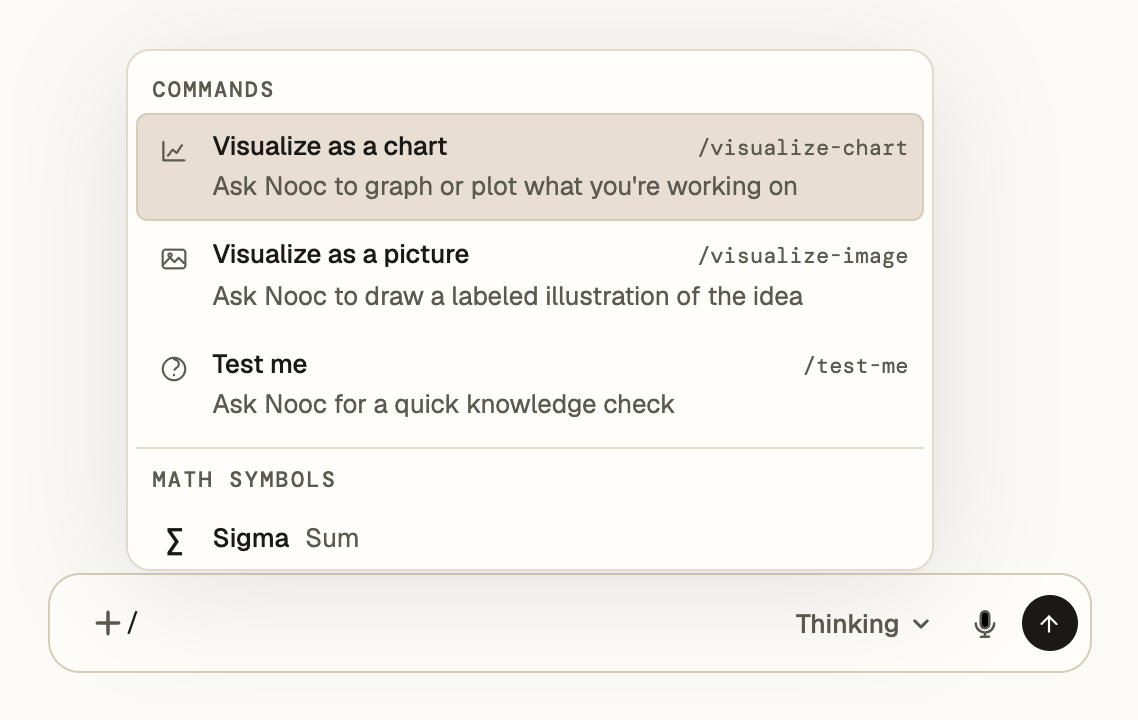
How it works
- Type
/in the composerSkills are listed first, under Commands.
- Pick a skill
It stays in your message as a chip.
- Add what it should work on
A topic, a question, or a file you tag with
@. Then send.
Test me
/test-me
A few multiple-choice questions on what you’re studying, answered right in the chat. Try one:

What does aₙ = √(4 + 1/n) converge to?
Visualize as a chart
/visualize-chart
An interactive chart of the function or data you’re working on. Zoom with the slider, or open the numbers with Show data.
aₙ = √(4 + 1/n)
The terms fall toward 2 as n grows.
Visualize as a picture
/visualize-image
A labeled illustration, for ideas that are easier to see than to plot, like a structure or a process.
The same menu inserts math symbols too. Type /sigma or /alpha to find one.